Keychron K3 Ultra-Slim Review: Style Meets Compromise
The Keychron K3 Ultra-Slim is one of those keyboards that immediately makes sense if you care about how your desk looks as much as how it functions. It’s slim, low-profile, backlit, and clearly designed to sit comfortably within a considered workspace rather than dominate it.
Table Of Content
This review is based on long-term, first-hand daily use — not a quick unboxing or spec comparison. It’s written from the perspective of someone using the K3 as part of a real desk setup, alongside a MacBook Pro, external display, and multiple devices.
Design, build quality & desk presence
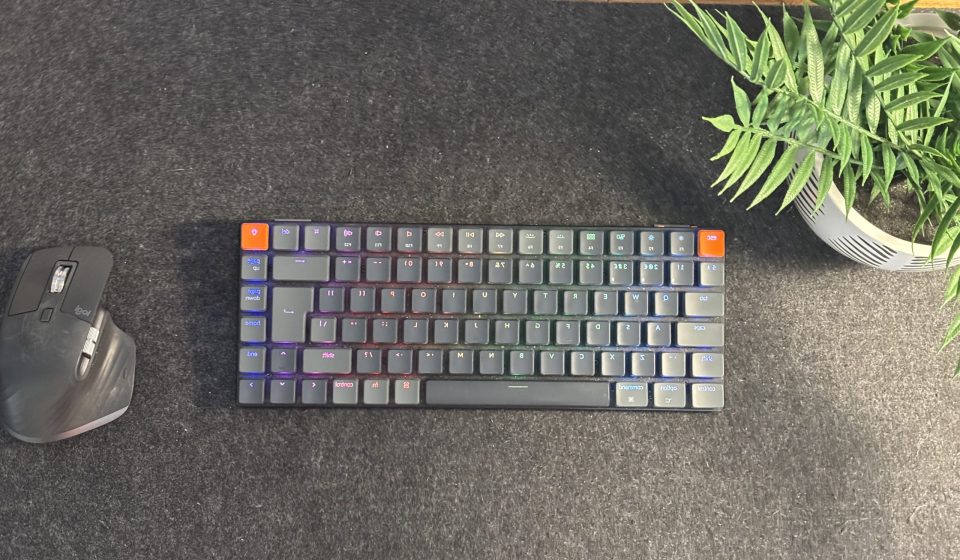
At first glance, the Keychron K3 Ultra-Slim does exactly what it promises. It looks clean, modern, and intentional on a desk.
The keyboard is largely plastic, which is noticeable when you pick it up — but not in a negative way. Despite the materials, it feels solid in the hands and well put together. There’s very little flex, and it doesn’t feel flimsy or toy-like, which is often the risk with ultra-slim peripherals.
That said, there are a couple of build details that let it down. The adjustable feet on the underside are fitted with small rubber strips that appear to be lightly glued on. In practice, these come unstuck very quickly. It’s a minor issue, but it does hint at cost-cutting or rushed finishing, and it slightly undermines the otherwise solid feel of the keyboard.
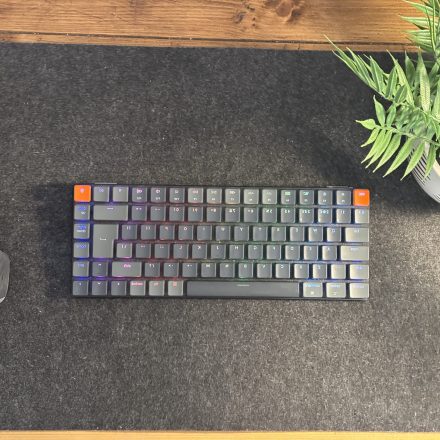
Visually, though, the K3 holds its own. With the lights on or off, it looks like a piece of considered desk equipment rather than a generic accessory — and it catches the eye without feeling loud.
Lighting: not just a gimmick
Backlighting on keyboards often feels like an afterthought, but that’s not the case here.
The Keychron K3’s lights are bright enough to properly illuminate the keys and are visible even from across the room. More importantly, they add warmth and atmosphere to a workspace rather than screaming for attention.
There’s also an impressively wide range of lighting modes available, including:
- A ‘chasing’ effect
- Random blink patterns
- A slow, soft fade
- Solid colours for a more restrained look
Whether you prefer something subtle or a bit more expressive, the lighting feels flexible rather than gimmicky — and it elevates the keyboard’s presence on the desk.
Daily typing experience
In day-to-day use, the K3 is an enjoyable keyboard to type on.
The low-profile mechanical switches provide tactile feedback without feeling bulky, and the slim form factor keeps the desk feeling open and uncluttered. It’s comfortable for long working sessions and doesn’t demand much adjustment if you’re coming from something like an Apple keyboard.
This isn’t a keyboard aimed at mechanical keyboard enthusiasts who want to tweak every aspect of their setup — it’s aimed at people who want something that feels good to type on while still fitting into a clean, minimal workspace.
Bluetooth performance & battery life: real-world frustrations
This is where the Keychron K3 Ultra-Slim shows its weakest side.
Straight out of the box, the Bluetooth connection is noticeably unstable once the keyboard is more than a couple of feet away from the computer. When paired with a MacBook Pro, this becomes particularly frustrating if you like to position the keyboard slightly further back on the desk — for example, tucked under or behind a second display.
In practice, this meant repositioning the MacBook closer to the keyboard to avoid connection drops. Once that adjustment is made, the Bluetooth issues disappear — but it’s an annoyance you shouldn’t really have to work around.
Battery life is another compromise. On average, you can expect around a day and a half of use before needing to recharge. That’s manageable, but it does require recalibrating your habits. You need to remember to charge it daily, just in case, especially if you’re used to the long battery life of an Apple keyboard.
Customer support doesn’t inspire much confidence either. When issues were raised, support simply pointed back to Amazon (where the keyboard was purchased), which felt unhelpful and dismissive.
Multi-device switching: the standout feature
If there’s one feature that genuinely shines, it’s the ability to switch between three devices seamlessly.
The Keychron K3 allows you to store up to three paired devices and switch between them instantly using:
- fn + 1
- fn + 2
- fn + 3
In practice, this works extremely well. Moving between a Mac, a PC, and an iPad is quick and reliable, with no need to re-pair each time. For anyone working across multiple devices, this alone makes the K3 a joy to use and easily one of its best features.
Keychron K3 vs K3 v2
Keychron’s naming can be slightly confusing, but the K3 v2 is essentially a refined version of the original K3, with small improvements rather than a complete redesign.
If you’re shopping today, you’re likely looking at the v2 by default. The overall experience remains largely the same, so most buying decisions should come down to price, availability, and layout rather than worrying too much about generational differences.
Check current UK pricing for the Keychron K3 Ultra-SlimFinal thoughts: who the Keychron K3 Ultra-Slim is for
Once the keyboard is positioned closer to the computer and you accept that it needs charging more frequently than some alternatives, the technical frustrations largely fade away.
What remains is a keyboard that looks genuinely good on a desk, feels satisfying to type on, and integrates well into a modern, multi-device workflow.
The Keychron K3 Ultra-Slim isn’t perfect — but it’s a very enjoyable keyboard to both see on the desk and use. For anyone building a clean, considered workspace and willing to accept a few compromises, it earns its place.